Let's play!
Virus Breakout Arcade Game

Virus Breakout Arcade Game

Arcade
Developer: Quartz Edge Studio
Published: 2025-12-16
Updated: 2026-07-05

What players say

Virus Breakout is a well-designed arcade game that successfully reimagines the classic breakout formula. The 24 levels offer a good progression of difficulty, and the special blocks add welcome variety. Controls are responsive, and the family-friendly theme makes it suitable for players of all ages. It is a solid choice for casual gaming sessions.

About this game

Game Introduction

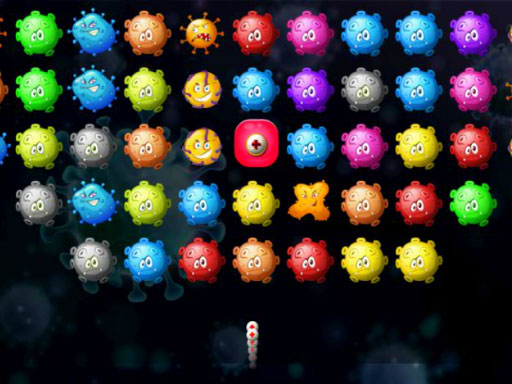
Virus Breakout is a family-friendly arcade game that offers a fresh take on the classic breakout experience. Players control a paddle at the bottom of the screen to bounce a ball upward, aiming to clear all virus blocks and special blocks on each level. The game features 24 progressively challenging stages, each with new block formations and obstacles that require quick reflexes and strategic thinking. Designed to be safe and enjoyable for all ages, Virus Breakout contains no violent or inappropriate content, making it a perfect choice for casual gamers and breakout enthusiasts alike.

How to Play

To play Virus Breakout, use your mouse or touch controls to move the paddle left and right. The goal is to bounce the ball to hit and eliminate every virus block on the screen. Different block types may require multiple hits to break, and special blocks can trigger helpful effects like expanding the paddle or adding extra balls. You have a limited number of lives, so avoid letting the ball fall off the bottom. Clear all virus blocks to complete the level and unlock the next challenge. With 24 levels to conquer, careful aiming and quick reactions are key to success.

Game Features

Game features include 24 challenging levels with unique block formations, virus and special blocks that add variety, classic breakout gameplay with a fresh theme, and a family-friendly design suitable for all ages. The controls are simple and responsive, making it easy to pick up and play.

Tips for Success

To succeed in Virus Breakout, focus on keeping the ball in play by positioning your paddle centrally. Aim for blocks that are hardest to reach first, and try to angle your shots to hit multiple blocks in one bounce. Watch for special blocks that can give you advantages like a wider paddle or extra balls, and use them wisely. Practice your timing and reflexes to handle increasingly complex block formations as you progress through the 24 levels.


Compatibility

This H5 game runs smoothly on:
• Desktop computers (Windows / Mac) • Mobile phones (iPhone / Android)
• Tablets (iPad / Android)
🌐 Best experienced with Chrome, Safari, or Edge
FAQ
Is Virus Breakout available on mobile devices?
The game is designed with simple mouse or touch controls, so it may be playable on mobile devices through a web browser. Check the game's platform details for specific compatibility information.
What happens when I lose all my lives in Virus Breakout?
If you lose all your lives, the game typically ends for that session. You can then restart the level or start over from the beginning, depending on the game's settings.
Are there different difficulty levels in Virus Breakout?
The game includes 24 levels that progressively increase in challenge. While there may not be separate difficulty settings, the natural progression from easier to harder levels provides a gradual increase in difficulty.
Can I play Virus Breakout with a keyboard?
The game primarily uses mouse or touch controls for moving the paddle. Keyboard controls may not be supported, but you can check the game's control options for alternative input methods.
Does Virus Breakout have a scoring system?
Many breakout-style games include a scoring system based on blocks destroyed and balls used. Virus Breakout likely tracks your performance, but specific scoring details are not provided in the description.
Is there a way to pause the game in Virus Breakout?
Most arcade games include a pause feature, often accessed by clicking a button or pressing a key. Virus Breakout likely has a pause option, but you should check the game interface for the specific pause control.
Advertisement

Relevant Games