Catch the Fluffy Orb: Reflex Challenge

Developer: Page Core Creations
Published: 2026-04-27
Updated: 2026-07-30
Catch the Fluffy Orb: Reflex Challenge
Play Now - It's Free
Advertisement

Report an Issue

Let us know what's wrong with this game

Review

Catch the Fluffy Orb delivers exactly what it promises: a simple, responsive test of hand-eye coordination. The controls are intuitive, the visual design is clear, and the gradual difficulty ramp-up provides a satisfying challenge. It works flawlessly on mobile browsers, making it a great choice for short gaming sessions. While it lacks depth or progression systems, its focus on core reflex training is executed well. A solid pick for casual players looking to sharpen their reaction time.

About This Game

Core Gameplay Loop

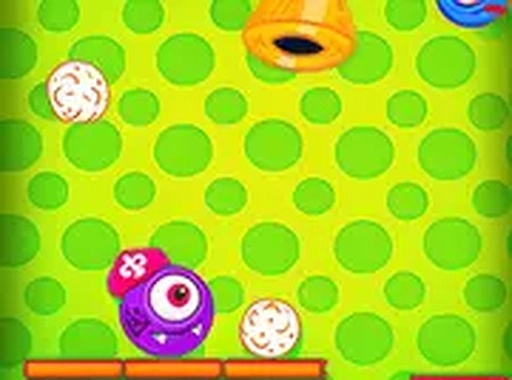
Players control a small character that moves left or right by following the mouse cursor. The objective is to position the character beneath falling orbs to catch them. Each successful catch increases the score. Obstacles also descend, and contact with any obstacle immediately ends the session. The playing field includes platforms that the character must land on to avoid falling out of bounds. This straightforward setup creates a clear goal: maximize your score by catching as many orbs as possible while avoiding hazards.

Difficulty Progression

As the session continues, the rate at which orbs and obstacles fall gradually increases. This means players must react faster and plan their movements more carefully. Early rounds allow for relaxed play, but later stages demand quick decisions and precise positioning. The increasing speed ensures that each attempt feels fresh and challenging, encouraging players to improve their reflexes with repeated play. This natural escalation keeps the experience engaging without requiring complex tutorials or instructions.

Visual Style and Accessibility

The game uses bright, simple graphics that are easy on the eyes and suitable for players of all ages. The character and orbs are clearly distinguishable from the background and obstacles, making it easy to track multiple elements on screen. Full-screen mode is available for those who want a more focused view. The game runs directly in a web browser on both desktop and mobile devices, with no downloads or installations needed. This makes it accessible for quick play during breaks or while commuting.

Tips for Improving Performance

Regular practice helps build muscle memory for faster reactions. Anticipating where orbs will land and moving the character early can give an edge. Observing obstacle patterns over multiple attempts allows players to predict and avoid them more effectively. Using full-screen mode reduces visual clutter. Taking short breaks during longer play sessions helps maintain concentration and prevents fatigue. These strategies can help players achieve higher scores and enjoy the game more fully.

Compatibility

✅ Works on PC & Mobile | Recommended: Chrome / Safari / Edge

Comments

0 comments
U
User
Loading comments...

Faq

Can I play Catch the Fluffy Orb on my phone?
Yes, the game works on mobile browsers just as well as on desktop. It uses mouse or touch input, so you can play by tapping or dragging on your phone screen. No app download is required.
Is there a way to pause the game?
The game does not include a pause feature, as each round is designed to be short. However, you can simply stop playing at any time, and your score resets when you start a new session.
Does the game save my high score?
The game does not save scores between sessions. Each time you play, you start from zero. This keeps the experience simple and focused on improving your personal best within a single play session.
Are there different levels or stages?
The game uses a continuous difficulty curve rather than distinct levels. As you catch more orbs, the speed gradually increases, creating a natural progression without explicit stage transitions.
Can I change the character's appearance?
No, the character has a fixed design. The game emphasizes simple, consistent visuals to keep the focus on gameplay. There are no customization options available.
Is there any sound or music in the game?
The game includes basic sound effects for catching orbs and hitting obstacles, but there is no background music. This keeps the experience light and suitable for quiet environments.